Windows guide
DVD Conversion Picked a Bonus Clip Instead of the Film
Compare durations and chapter counts in the DVD title picker, then match one scene to the source disc before converting the rest.
Download All Free Video ConverterWindows 10/11 (64-bit) · 2.07 MiB online installer. Internet required to download program components.
Establish a reference before importing
Play the original DVD folder in a player that supports its menus. Note the running time of the item you actually want and a scene you can recognize near the start. A 96-minute main film and a 12-minute interview can live in the same VIDEO_TS folder.
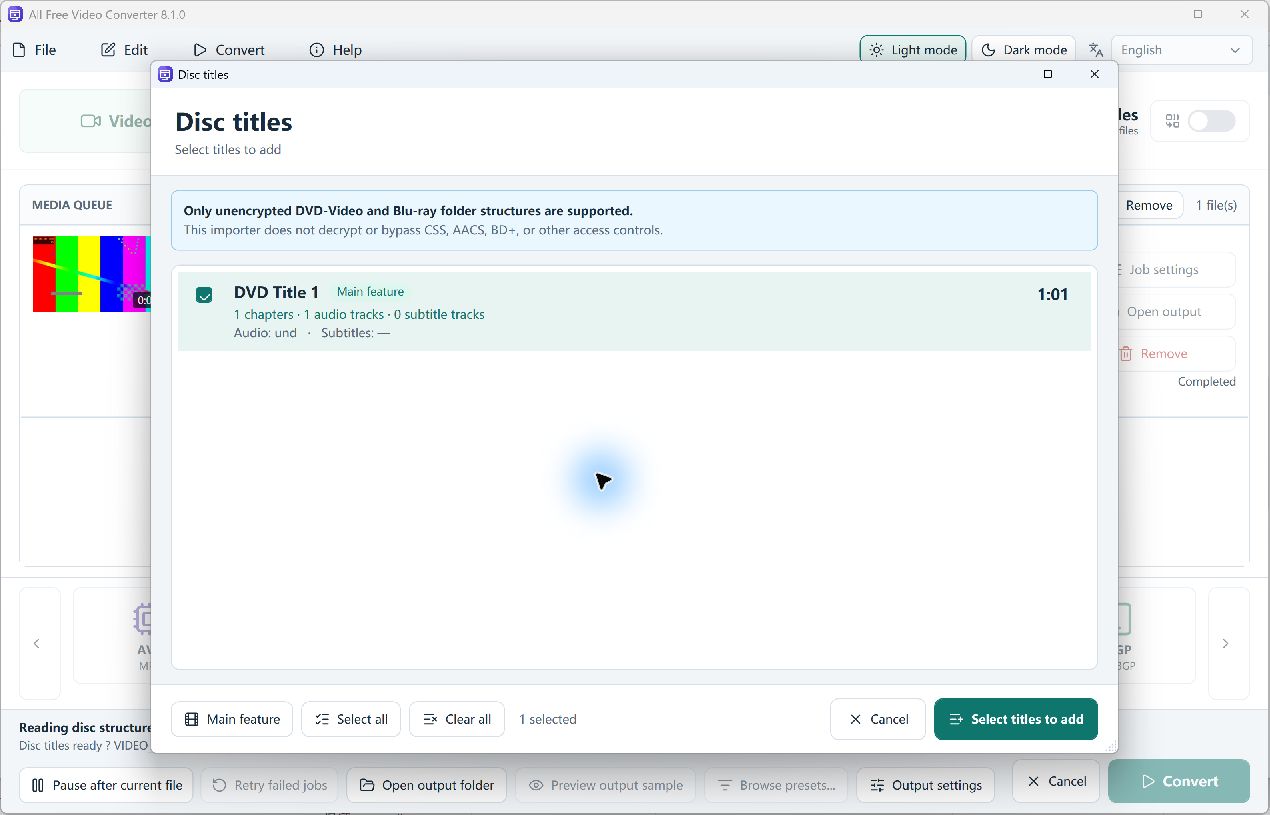
Compare the rows in Disc titles
Choose DVD / Blu-ray and open the complete, unencrypted VIDEO_TS folder you are authorized to convert. Keep the IFO and VOB files together. Compare the rows in Disc titles by duration, chapters and track count. Treat the Main feature label as a starting point. Select the matching row and choose Select titles to add.
Verify the selected scene in the MP4
Select MP4 · H.264, choose a destination in Output settings and convert one title. If the opening scene or length is wrong, return to the title picker and compare the closest candidate. If the picture is right but the language is wrong, revisit Tracks for that queued item.